arrows-to-circlePCG Data Asset

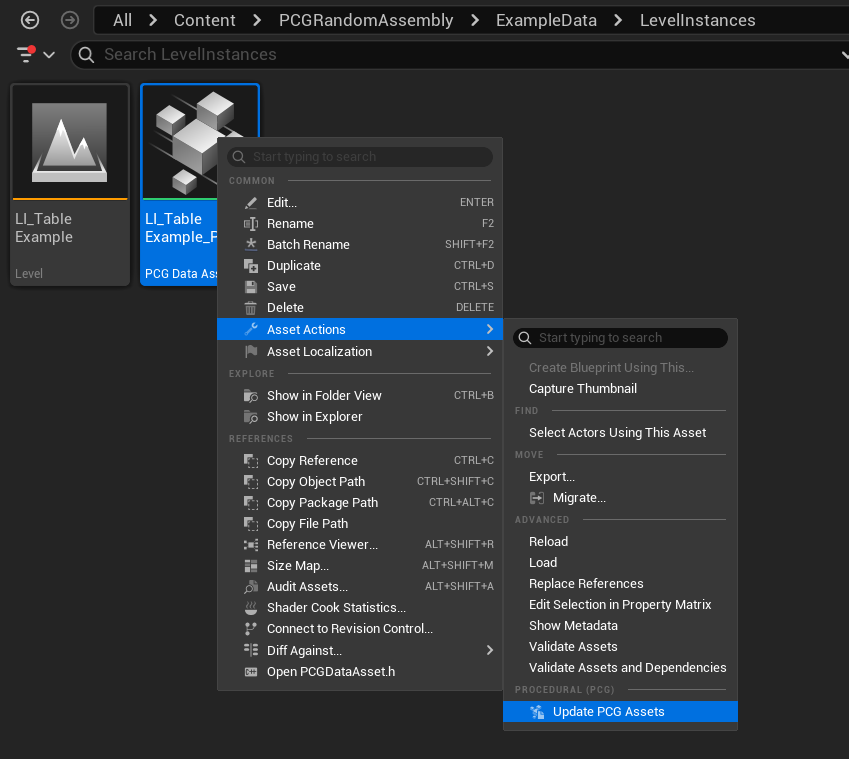
First of all you will need a PCG Data asset, it can be created from a right click on a level instance asset in the content browser. Follow these two steps:


1) Create a level instance with a bunch of StaticMesh Actors selected, then right click β‡’ Level β‡’ Create Level Instance.

A Level instance is a regular Level which can be used in other level (more infos herearrow-up-right).

chevron-rightActors of the level instance must have an Actor tag properly set to bind them to a variant definition (random XForm, mesh, etc).hashtag
Example of actor tags.
Where to set actor tag on static mesh actors.
circle-info

To easily set tags on actors, check Actor Tags manager (available on fab) !

Create of a level instance from selected Actor(s).
circle-info

The tool works with Packed level instance as well as Level Instance but keep in mind than other actors than static mesh actors in a Level Instance will be ignored.


2) Then you can create PCG Data asset from level instance by a right click on the level instance asset in the content browser.

By default it saves it on the same folder with a _PCG prefix. It's perfectly fine but you can of course save it wherever you want.


3) You create a new Random Assembly Defintion and add the freshly created PCG Data Asset in its PCG Asset entry:


You can edit a level instance content directly from the edit button on the level instance actor:

Warning:

If you update the content of the level instance, (tags, or adding / removing actors), you'll need to update the PCG Data Asset accordingly either from:


Last updated