> For the complete documentation index, see [llms.txt](https://cgtoolbox.gitbook.io/cgtoolbox-docs/llms.txt). Markdown versions of documentation pages are available by appending `.md` to page URLs; this page is available as [Markdown](https://cgtoolbox.gitbook.io/cgtoolbox-docs/pcg-random-assemblies/data-structure.md).

# Data structure

The tool need multiple data / actors to function:

<figure><img src="/files/rSp8l96j5VWsj5Fw35nF" alt=""><figcaption><p>Diagram of the data needed to produce random assemblies.</p></figcaption></figure>

***

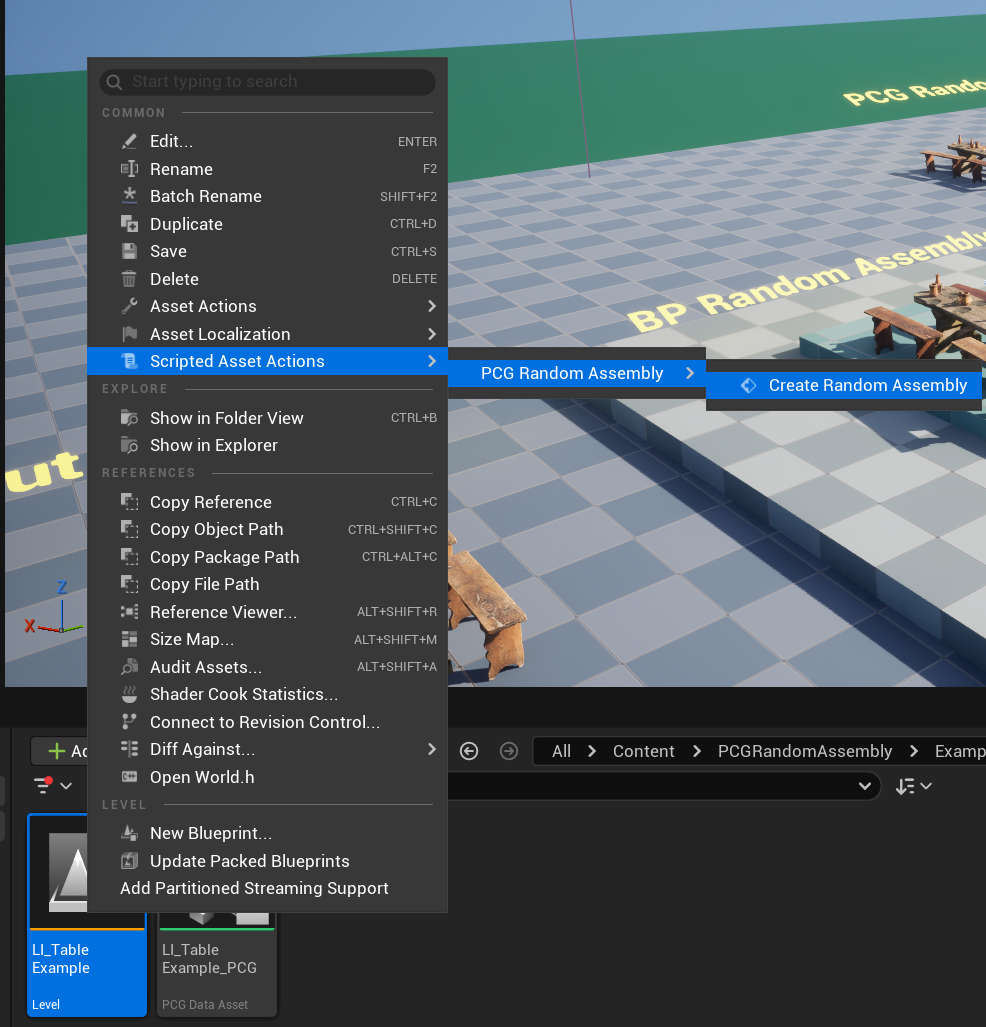
The starting point of the tool is a [Level instance](https://dev.epicgames.com/documentation/en-us/unreal-engine/level-instancing-in-unreal-engine), all other data can be created with an Asset Action helper, with a right click on the Level instance asset:

{% hint style="danger" %}

### **It only works with level instances made exclusively with static mesh actors.**

{% endhint %}

<figure><img src="/files/s8WwkMow93OsI52O4Oel" alt=""><figcaption></figcaption></figure>

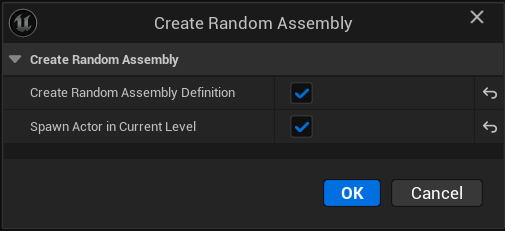
This will ask you if you want to create the random definition and spawn the actor in the current level:

<figure><img src="/files/2DWxYPC1y14dOsklba3Q" alt=""><figcaption></figcaption></figure>

***

<p align="center"><mark style="color:$success;"><strong>Bellow, see the details on what are the assets needed:</strong></mark></p>

### PCG Data asset

A [PCG data asset](/cgtoolbox-docs/pcg-random-assemblies/pcg-data-asset.md) is a representation of a [Level instance](https://dev.epicgames.com/documentation/en-us/unreal-engine/level-instancing-in-unreal-engine) content into a PCG point cloud data, where each actor position is stored, its staticmesh, as well as their actor tags as attribute.&#x20;

### BP\_RandomAssembly

An Blueprint Actor which can read a [Random Assembly Definition](/cgtoolbox-docs/pcg-random-assemblies/random-assembly-definition.md) and output mesh instancers using PCG.

The meshes are generated from the PCG Data Asset point cloud data + all [variant definitions](/cgtoolbox-docs/pcg-random-assemblies/variant-definition.md) evaluation.

This is also where you can find some debug information with the [Random Assembly Widget](/cgtoolbox-docs/pcg-random-assemblies/random-assembly-widget.md).

### Random Assembly Definition

A simple data asset which contains a reference to a PCG Data asset, a list of variants and a static mesh spawner PCG settings node.

Blueprint type: [BPDA\_RandomAssemblyDefinition](/cgtoolbox-docs/pcg-random-assemblies/random-assembly-definition.md)

### Random Variant Definition

A data asset where you set the randomization settings such as Xform, Removale probability, static mesh variations, projection (landscape, world static), etc.

This is also where the tag(s) needed to identify on which actor(s) the variant(s) will be applied is stored.

Blueprint type: [BPDA\_VariantDefinition](/cgtoolbox-docs/pcg-random-assemblies/variant-definition.md)

***

### Process Random Assemblies

[PCG graph subgraph loop](/cgtoolbox-docs/pcg-random-assemblies/pcg-process-random-assemblies.md) node to be able to apply variants on custom PCG graph points, from landscape sampling, grid, etc...

***


---

# Agent Instructions
This documentation is published with GitBook. GitBook is the documentation platform designed so that both humans and AI agents can read, navigate, and reason over technical content effectively. Learn more at gitbook.com.

## Querying This Documentation
If you need additional information that is not directly available in this page, you can query the documentation dynamically by asking a question.

Perform an HTTP GET request on the current page URL with the `ask` query parameter, and the optional `goal` query parameter:

```
GET https://cgtoolbox.gitbook.io/cgtoolbox-docs/pcg-random-assemblies/data-structure.md?ask=<question>&goal=<endgoal>
```

`ask` is the immediate question: it should be specific, self-contained, and written in natural language.
`goal` is optional and describes the broader end goal you are ultimately trying to accomplish on behalf of the user. GitBook uses it to tailor the answer towards what is most useful for that goal.

The response will contain a direct answer to the question and relevant excerpts and sources from the documentation.

Use this mechanism when the answer is not explicitly present in the current page, you need clarification or additional context, or you want to retrieve related documentation sections.