> For the complete documentation index, see [llms.txt](https://cgtoolbox.gitbook.io/cgtoolbox-docs/llms.txt). Markdown versions of documentation pages are available by appending `.md` to page URLs; this page is available as [Markdown](https://cgtoolbox.gitbook.io/cgtoolbox-docs/pcg-random-assemblies/pcg-process-random-assemblies.md).
# PCG Process Random Assemblies
***
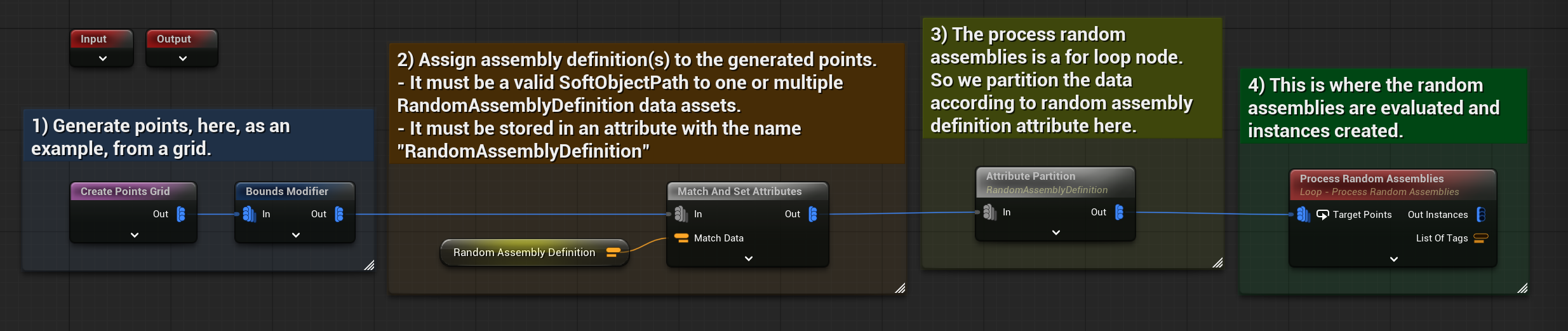
Instead of using the BP Random Assembly actor, you can use a PCG subgraph loop node "Process Random Assemblies" to apply assemblies on custom points, such as points sampled out of a landscape, a grid, or any other rules.
Example of two Random Assembly Definition applied on points generated from a grid.
{% hint style="info" %}
A PCG template graph is available: TPL\_ProcessRandomAssemblies to help you setup your custom graph.
{% endhint %}
TPL_ProcessRandomAssemblies template graph.
***
The PCG node has few parameters, very similar to the ones found on the [BP random assembly actor](/cgtoolbox-docs/pcg-random-assemblies/bp-random-assembly.md):
**Show Tag:** Same as the show tags of the Random Assembly Utility Widget
**Output Instances:** If True, output the instances (spawn static mesh) inside this node directly, otherwise, it output only points with a "StaticMesh" attribute. Then the user can decide to spawn them in a custom way.
**Debug infos:** Will print out some info (tag being processed etc.) in the output log.
**Seed:** The main random seed used by the graph, each variant will have it's own seed as well.
**Self pruning factor:** If any variant as its self pruning option to True, this value will be used by the Self Pruning node as "Radius Similarity Factor".
**Seed from position:** Each point will have a different seed, generated from its position.
**Direct spawn invalid variants:** If True, all the actors from the PCG data which don't match with any variant tags, will be spawned directly, before the variants evaluation. Meaning they will be available as collision data for all variants. If False, they will be spawned on the same time, after all variant evaluations.
***