> For the complete documentation index, see [llms.txt](https://cgtoolbox.gitbook.io/cgtoolbox-docs/llms.txt). Markdown versions of documentation pages are available by appending `.md` to page URLs; this page is available as [Markdown](https://cgtoolbox.gitbook.io/cgtoolbox-docs/pcg-random-assemblies/bp-random-assembly.md).
# BP Random Assembly
BP\_RandomAssembly Is an actor which allow you to read a Random Assembly definition data asset and output static meshes (Instancers).
It can be found here:
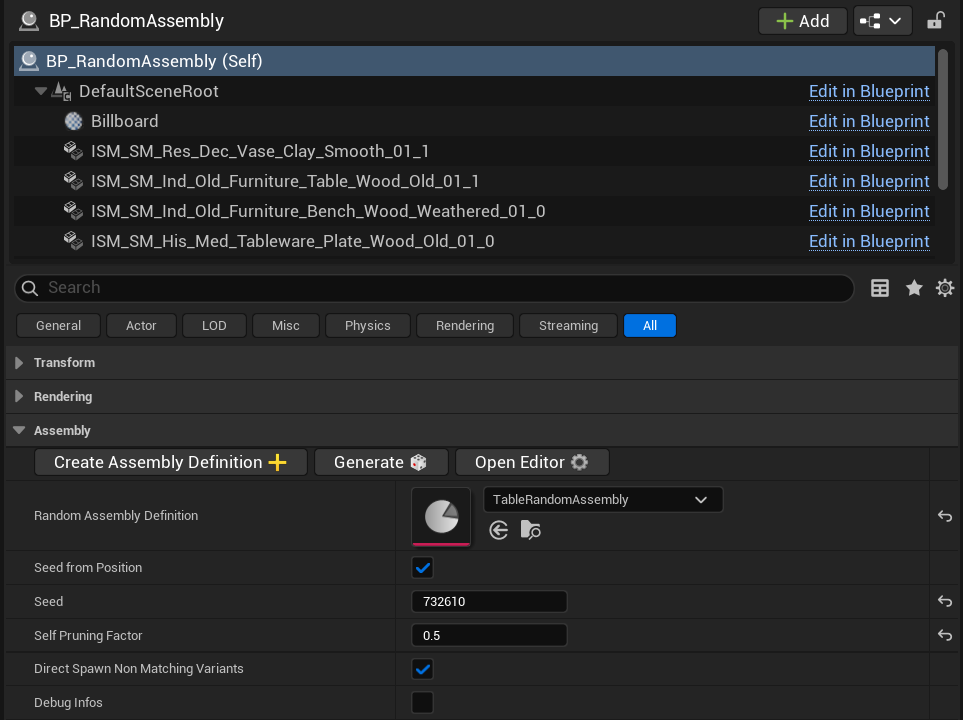
As almost all settings of the tool are defined in the[ Random Assembly Definition](/cgtoolbox-docs/pcg-random-assemblies/random-assembly-definition.md) data asset, the actor has very few parameters:
***
 Create a new empty [Random Assembly Definition](/cgtoolbox-docs/pcg-random-assemblies/random-assembly-definition.md).
 Generate a new result from a new random seed.
 Open the Random Assembly editor utility widget, to have debug infos and variant creation helper.
**Random Assembly Definition:** The [random assembly definition](/cgtoolbox-docs/pcg-random-assemblies/random-assembly-definition.md) data asset (PCG data asset + variants) to evaluate.
**Seed From Position:** If True, the random assembly will be regenerated each time the blueprint actor is moved. If False, the seed will be fixed, and can be changed manually or using the "Generate" button.
Seed from position: False
Seed from position: True
**Seed:** The random seed used by the random assembly PCG. This will be automatically updated if seed from position option if True.
**Self Pruning Factor:** If any variant as its self pruning option to True, this value will be used by the Self Pruning node as "Radius Similarity Factor".
**Direct Spawn Non Matching Variants:** If True, all the actors from the PCG data which don't match with any variant tags, will be spawned directly, before the variants evaluation. Meaning they will be available as collision data for all variants. If False, they will be spawned on the same time, after all variant evaluations.
**Debug Info:** If True, print out some debug info in the output log (tags not found, tags being processed etc.).
```log
LogPCG: [BP_RandomAssembly_C_2 - Print String_3]: [PCG_AssemblyVariantBPWrapper::Print String_3]: ---- Processing tag: Bench ----
LogPCG: [BP_RandomAssembly_C_2 - Print String_41]: [PCG_AssemblyVariantBPWrapper::Print String_41]: 4 Point(s) with current tag
LogPCG: [BP_RandomAssembly_C_2 - Print String_19]: [PCG_AssemblyVariantBPWrapper::Print String_19]: ---- End of tag processing. ----
LogPCG: [BP_RandomAssembly_C_2 - Print String_3]: [PCG_AssemblyVariantBPWrapper::Print String_3]: ---- Processing tag: Table ----
LogPCG: [BP_RandomAssembly_C_2 - Print String_41]: [PCG_AssemblyVariantBPWrapper::Print String_41]: 1 Point(s) with current tag
LogPCG: [BP_RandomAssembly_C_2 - Print String_19]: [PCG_AssemblyVariantBPWrapper::Print String_19]: ---- End of tag processing. ----
LogPCG: [BP_RandomAssembly_C_2 - Print String_3]: [PCG_AssemblyVariantBPWrapper::Print String_3]: ---- Processing tag: Plate ----
LogPCG: [BP_RandomAssembly_C_2 - Print String_41]: [PCG_AssemblyVariantBPWrapper::Print String_41]: 8 Point(s) with current tag
LogPCG: [BP_RandomAssembly_C_2 - Print String_19]: [PCG_AssemblyVariantBPWrapper::Print String_19]: ---- End of tag processing. ----
LogPCG: [BP_RandomAssembly_C_2 - Print String_3]: [PCG_AssemblyVariantBPWrapper::Print String_3]: ---- Processing tag: Bread ----
LogPCG: [BP_RandomAssembly_C_2 - Print String_41]: [PCG_AssemblyVariantBPWrapper::Print String_41]: 5 Point(s) with current tag
LogPCG: [BP_RandomAssembly_C_2 - Print String_19]: [PCG_AssemblyVariantBPWrapper::Print String_19]: ---- End of tag processing. ----
LogPCG: [BP_RandomAssembly_C_2 - Print String_3]: [PCG_AssemblyVariantBPWrapper::Print String_3]: ---- Processing tag: Pie ----
LogPCG: [BP_RandomAssembly_C_2 - Print String_41]: [PCG_AssemblyVariantBPWrapper::Print String_41]: 3 Point(s) with current tag
LogPCG: [BP_RandomAssembly_C_2 - Print String_19]: [PCG_AssemblyVariantBPWrapper::Print String_19]: ---- End of tag processing. ----
LogPCG: [BP_RandomAssembly_C_2 - Print String_3]: [PCG_AssemblyVariantBPWrapper::Print String_3]: ---- Processing tag: Drinks ----
LogPCG: [BP_RandomAssembly_C_2 - Print String_41]: [PCG_AssemblyVariantBPWrapper::Print String_41]: 10 Point(s) with current tag
LogPCG: [BP_RandomAssembly_C_2 - Print String_19]: [PCG_AssemblyVariantBPWrapper::Print String_19]: ---- End of tag processing. ----
```
***